SWIFT MT103 Field Reference — Every Field Explained | Ohmyfin

Last reviewed: · Curated by Ohmyfin Organisation editorial.

Decode every field on a SWIFT MT103 or MT202 message. Each page explains the field's purpose, format, examples and how it connects to SWIFT GPI tracking on Ohmyfin.
Payment Tracker

LIVE

Paste your UETR — we query the SWIFT GPI network in real time.

36-character UUID from your MT103 field 121 or pacs.008 <UETR> tag. Where to find it →

Receive your tracking result instantly after search
If not found, we’ll monitor for 7 days and alert you
No account needed — one-click unsubscribe
2
Trusted by 2M+ users monthly  ·  No account or card required
Encrypted | SWIFT Network Coverage | Real-time GPI
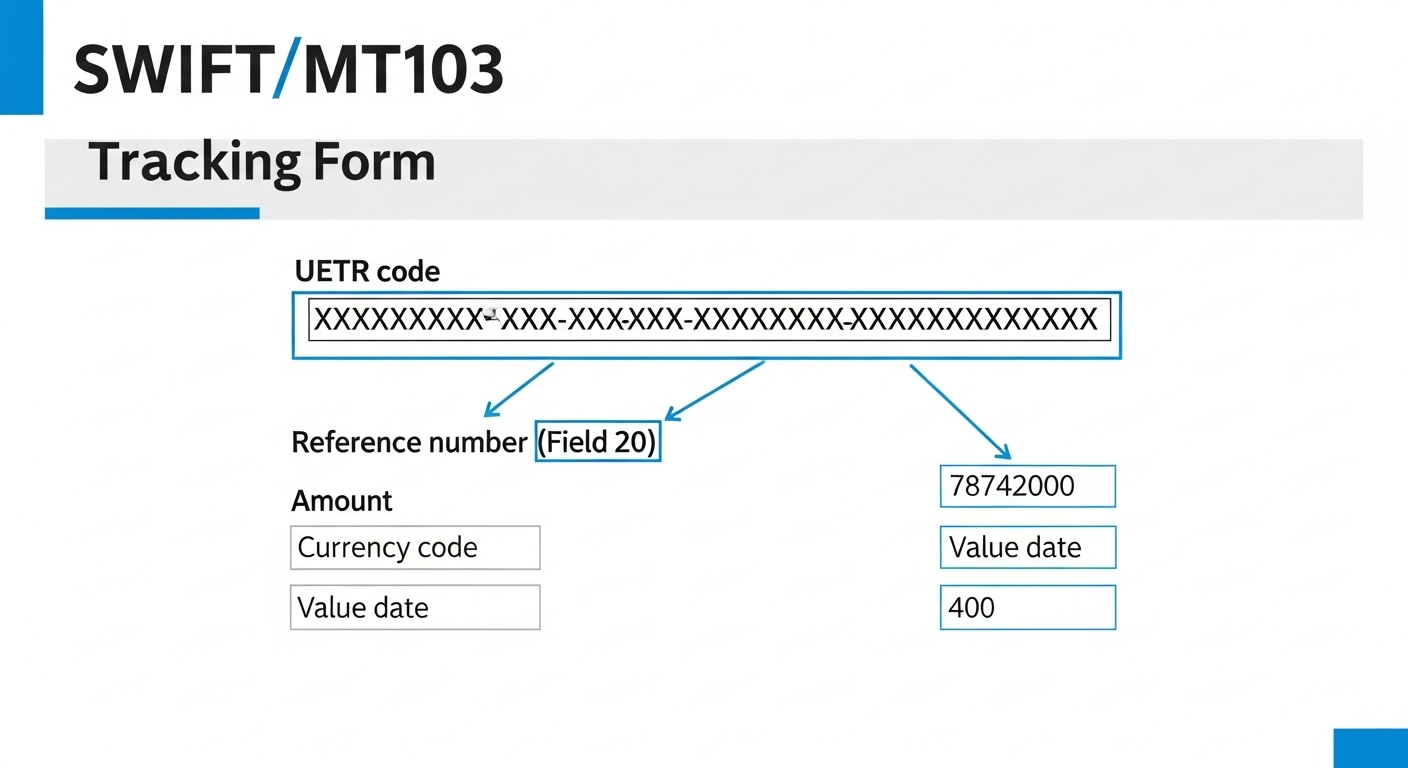
SWIFT MT103 message diagram showing fields 20, 32A, 50K, 59, 70 and 121 (UETR)
How an MT103 maps to the UETR (field 121), sender reference (field 20), value-date/currency/amount (field 32A) and beneficiary details. Source: SWIFT MT103 specification.

A–Z index — 20 entries

SWIFT MT103 Field 111 — Service Type Identifier Field 111 in block 3 of a SWIFT MT103 declares the GPI service type — 001 for standard customer credit transfer, 002 for cover, 003 for stop-and-recall. Mandatory for all SWIFT GPI member banks. SWIFT MT103 Field 121 — UETR Field 121 in block 3 of a SWIFT MT103 carries the UETR — the 36-character UUID v4 end-to-end tracking reference mandatory since November 2018. Paste the UETR into Ohmyfin to track the payment free. SWIFT MT103 Field 20 — Sender's Reference Field 20 on a SWIFT MT103 is the Sender's Reference (TRN) — up to 16 alphanumeric characters, unique within the sending bank. Look up any Field 20 reference free on Ohmyfin. SWIFT MT103 Field 21 — Related Reference Field 21 on a SWIFT MT103 carries the Related Reference — pointing to an earlier payment this message amends, reverses or relates to. Optional in most MT103s; up to 16 characters. SWIFT MT103 Field 23B — Bank Operation Code Field 23B on a SWIFT MT103 specifies the Bank Operation Code: CRED (standard), CRTS, SPAY, SPRI or SSTD. Mandatory on every MT103 — CRED is by far the most common code in cross-border wires. SWIFT MT103 Field 32A — Value Date / Currency / Amount Field 32A on a SWIFT MT103 carries the value date, ISO currency code and interbank settlement amount in one mandatory field. Format: YYMMDD + 3-letter ISO currency + amount with comma decimal separator. SWIFT MT103 Field 33B — Currency / Original Ordered Amount Field 33B on a SWIFT MT103 carries the original ordered currency and amount before any FX conversion. Used whenever field 32A currency differs from the customer's original instruction. SWIFT MT103 Field 50A — Ordering Customer (BIC) Field 50A on a SWIFT MT103 identifies the ordering customer by BIC — used when the originator is itself a financial institution. One of three variants: 50A (BIC), 50F (ISO 20022 structured), 50K (free-format). SWIFT MT103 Field 50F — Ordering Customer (Structured) Field 50F is the ISO 20022-aligned structured ordering-customer format on a SWIFT MT103, carrying the originator's name, address, country and identifier in tagged sub-fields. Replacing legacy 50K. SWIFT MT103 Field 50K — Ordering Customer (Free Format) Field 50K is the free-format ordering-customer field on a SWIFT MT103 — up to 4 lines of 35 characters for account number, name and address. The most common legacy variant, being replaced by structured 50F. SWIFT MT103 Field 52A — Ordering Institution Field 52A on a SWIFT MT103 identifies the ordering institution — the bank that instructed the payment when different from the SWIFT message sender. Optional; if absent the sender is assumed to be the ordering bank. SWIFT MT103 Field 53A — Sender's Correspondent Field 53A on a SWIFT MT103 identifies the sender's correspondent — the bank where the sender holds the nostro account that will be debited for settlement. Optional; identified by BIC or clearing code. SWIFT MT103 Field 54A — Receiver's Correspondent Field 54A on a SWIFT MT103 identifies the receiver's correspondent — the bank where the SWIFT message receiver holds a nostro account for settlement. Optional; mirror of field 53A on the receiver side. SWIFT MT103 Field 56A — Intermediary Institution Field 56A on a SWIFT MT103 identifies an intermediary bank in the payment chain between sender and beneficiary bank. Optional but critical on exotic corridors — carries the intermediary's BIC. SWIFT MT103 Field 57A — Account With Institution Field 57A on a SWIFT MT103 identifies the beneficiary's bank — where the final recipient holds their receiving account. A correct BIC in field 57A avoids delays and misrouting on cross-border wires. SWIFT MT103 Field 59 — Beneficiary Customer Field 59 on a SWIFT MT103 carries the final beneficiary's account number, name and address — mandatory on every payment. Variants 59A (BIC for FI) and 59F (ISO 20022 structured) are also supported. SWIFT MT103 Field 70 — Remittance Information Field 70 on a SWIFT MT103 carries free-format remittance information — invoice numbers, customer references, and payment notes visible on the beneficiary's bank statement. Up to 4 × 35 characters. SWIFT MT103 Field 71A — Details of Charges Field 71A on a SWIFT MT103 sets the charges bearer: OUR (sender pays all fees), SHA (each side pays its own bank), or BEN (beneficiary pays all fees). Mandatory on every MT103. SWIFT MT103 Field 71F — Sender's Charges Field 71F on a SWIFT MT103 carries the sending bank's charges expressed in the payment currency. Mandatory when field 71A is SHA or BEN — repeated for each correspondent bank in the chain. SWIFT MT103 Field 72 — Sender to Receiver Information Field 72 on a SWIFT MT103 carries bank-to-bank operational instructions not visible to the customer — structured codes like /ACC/, /INS/, /INT/, /BNF/. Optional; up to 6 lines × 35 characters.

Frequently asked questions

What is SWIFT field 121 (UETR)?

Field 121 carries the UETR — a 36-character UUID that uniquely identifies the payment end-to-end across every bank in the SWIFT GPI chain. It is mandatory on all GPI-enabled MT103 and MT202 messages since November 2018.

What is SWIFT field 32A?

Field 32A specifies the value date, currency, and amount of the transfer. The format is YYMMDD + 3-letter ISO 4217 currency code + amount (e.g. 260701USD10000,). It is mandatory on MT103 messages and tells every bank in the chain the settlement deadline.

What does field 71A (Details of Charges) mean?

Field 71A controls who pays the correspondent banking fees: OUR means the sender covers all charges; SHA means sender and beneficiary each pay their own bank; BEN means the beneficiary pays all fees. SHA is the most common international choice.

What is SWIFT field 57A?

Field 57A identifies the beneficiary's bank (Account With Institution) using its BIC code. It tells each correspondent bank where to forward the payment so it reaches the correct destination bank.

ExploreSWIFT trackerUETR trackerCurrency exchange ratesUSD → EUR rateGBP → USD rateEUR → GBP rateUSD → JPY rateWestern Union MTCN trackerMoneyGram reference trackerRia PIN trackerRemitly trackerXoom / PayPal trackerWorldRemit trackerWise trackerRevolut trackerOFX trackerZelle trackerVenmo trackerCash App trackerPayoneer trackerSkrill trackerNeteller trackerInstarem trackerTRN trackerDraft & validate hubMT ↔ MX translatorMX → MT translator@ohmyfin/swift-draft (npm)MT103 drafterMT202 drafterMT202COV drafterMT199 drafterpacs.008 drafterpacs.009 drafterpacs.002 draftercamt.053 draftercamt.054 drafterMT103 trackerWire-transfer trackerSWIFT GPI trackerBIC lookupIBAN explainedUETR explainedTRN explainedBIC explainedMT103 guideMT202 guidepacs.008 guideField 20Field 32AField 50KField 57AField 121 (UETR)Track USDTrack EURTrack GBPTrack CNYTrack INRSWIFT vs SEPASWIFT vs ACHSWIFT vs WiseUETR vs TRNBIC vs IBANMT103 vs pacs.008How long: UKHow long: USHow long: IndiaHow long: EurozoneStatus: ACSPStatus: ACCCStatus: RJCTStatus: PDNGSWIFT GPISWIFTNetOhmyfin AI AssistantSWIFT status todayBank trackersTrack HSBCTrack ChaseTrack BarclaysTrack NatWestTrack WiseTrack RevolutAsk: How to track SWIFTAsk: UETR not foundAsk: Stuck 2 weeksAsk: Get UETR from bankAsk: Is Ohmyfin freeAlliance AccessAlliance GatewaySWIFT GoKYC RegistryAbout swift.comSWIFT productsCurrency guidesPayment comparisonsPayment speedStatus codesPayments glossarySWIFT message typesSWIFT/BIC directoryCorrespondent banksKnowledge centerReject codesAC01 rejectAC04 rejectBE01 rejectCH09 rejectRR04 rejectHelp & troubleshootingPayment not receivedFind UETR on MT103Cancel SWIFT paymentFake MT103 warningMajor banksJPMorgan Chase BICHSBC BICDeutsche Bank BICCiti BICBNY Mellon BICCountry corridorsSend US → IndiaSend US → MexicoSend US → PhilippinesSend UK → IndiaSend UK → PakistanSend UAE → IndiaSend UAE → PhilippinesSend Saudi → IndiaSend Canada → IndiaSend Australia → IndiaMT message referenceMT202COVMT199MT940MT942MT900MT910MT195MT103 STPBanks by countryBanks in USBanks in UKBanks in GermanyBanks in IndiaBanks in ChinaBanks in UAEBanks in Saudi ArabiaBanks in SingaporeBanks in Hong KongBanks in JapanBanks in BrazilUse casesFreelancer paid abroadPay overseas supplierE-commerce payoutsTuition paymentReal estate abroadFamily remittanceScam alertsFake MT103 fraudMoney-transfer providersTrack WiseTrack RevolutTrack Western UnionTrack MoneyGramTrack RemitlyTrack RiaTrack XoomTrack WorldRemitTrack PayoneerTrack PayPalTrack OFXTrack SkrillTrack SendwaveTrack InstaremTrack TransferGoTrack Stripe payoutTrack AirwallexTrack HSBC Global MoneyTrack Monzo / Revolut / N26Wise vs RevolutWise vs PayPalWise vs Western UnionWise vs bank wireWestern Union vs MoneyGramRemitly vs Western UnionSend money to IndiaSend money to PhilippinesSend money to MexicoSend money to NigeriaSend money to PakistanSend money to UKAdvance-fee fraudBEC / CEO fraudPig butchering scamRomance scam wire